How to enable EDIT button in IE: Difference between revisions
From NEOSYS User Support Wiki
Jump to navigationJump to search
Created page with '== How to enable EDIT button (Command Bar) in Internet Explorer == To enable the Edit button in the Command Bar, do the following: #Open '''Internet Explorer''' #Click on the ''…' |
(No difference)
|
Latest revision as of 13:17, 12 December 2011
How to enable EDIT button (Command Bar) in Internet Explorer
To enable the Edit button in the Command Bar, do the following:
- Open Internet Explorer
- Click on the Tab button to display the Menu Bar.
- Right Click on the Menu Bar and Select Command Bar.
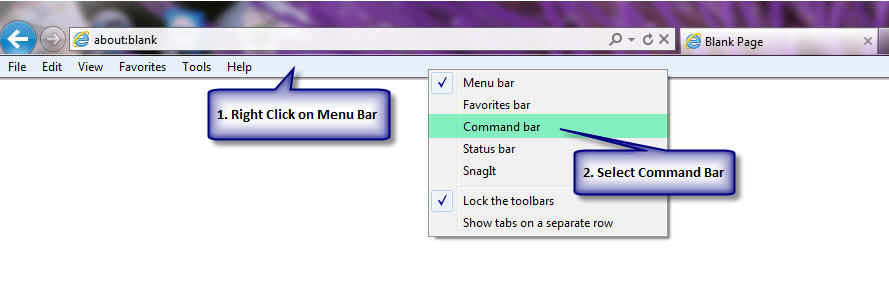
A new Toolbar i.e. the Command bar appears as follows:
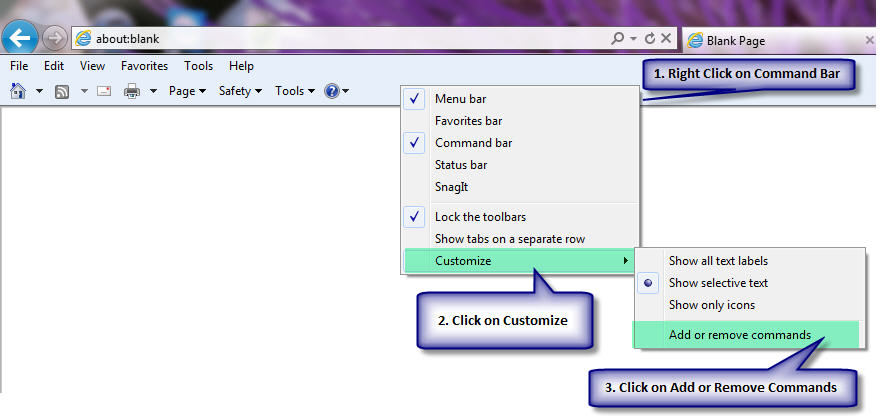
- Right Click on the Command Bar and Select Customize > Add or Remove Commands.
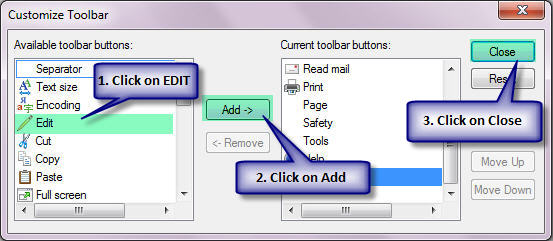
- From the Available Toolbar Buttons on the left hand side Select EDIT, Click on Add and Click on Close
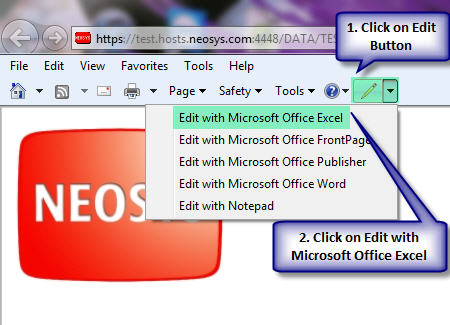
The EDIT Button shows up in your Command Bar. - You can now open the NEOSYS report in excel by Clicking on the Edit Button and Select Edit with Microsoft Office Excel.